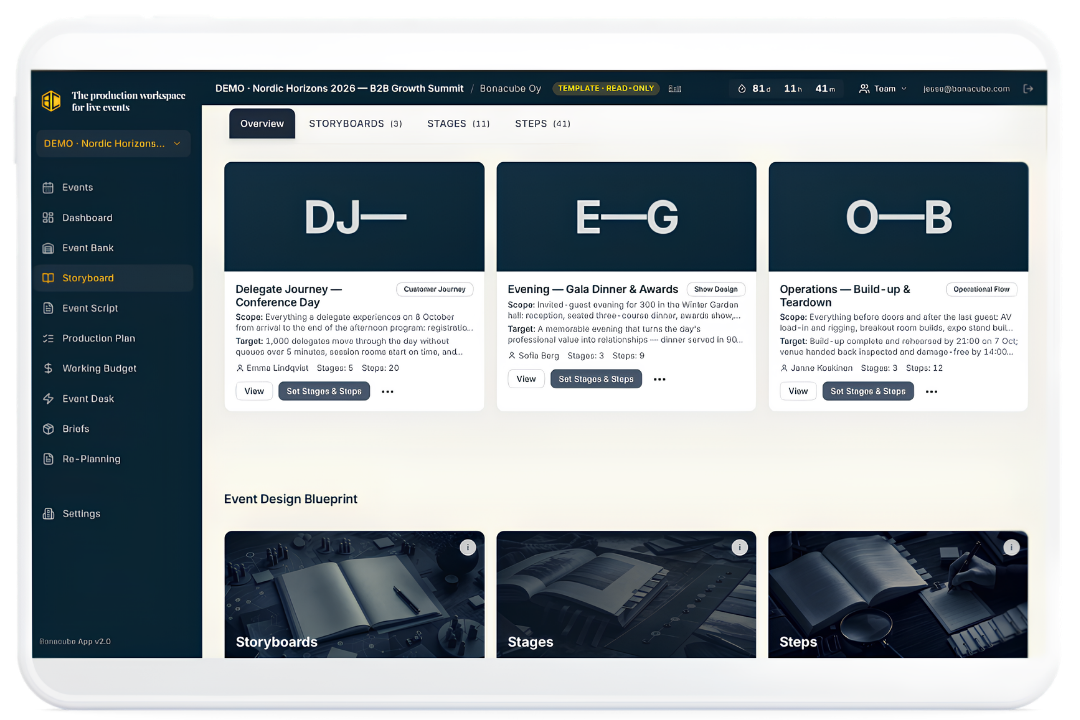
The production workspace for live events

Make the Event on Paper Work in Real Life.

Bonacube helps professional event teams turn an event idea into a production plan people can actually prepare. Plan every stage of the experience. Connect each moment to the space, equipment, people and services it needs. Keep the budget, suppliers, responsibilities and changes tied to the same plan.

So fewer details get lost, fewer problems appear late, and your team reaches implementation knowing what has been decided and what still needs to happen.

Up to 5 active events Built-in guidance included No setup fee
One connected workspace

One Place for the Whole Event.

Bonacube connects the experience, the resources, the budget, the suppliers and every change in a single plan — so your team can always see the whole event, not just their part of it.

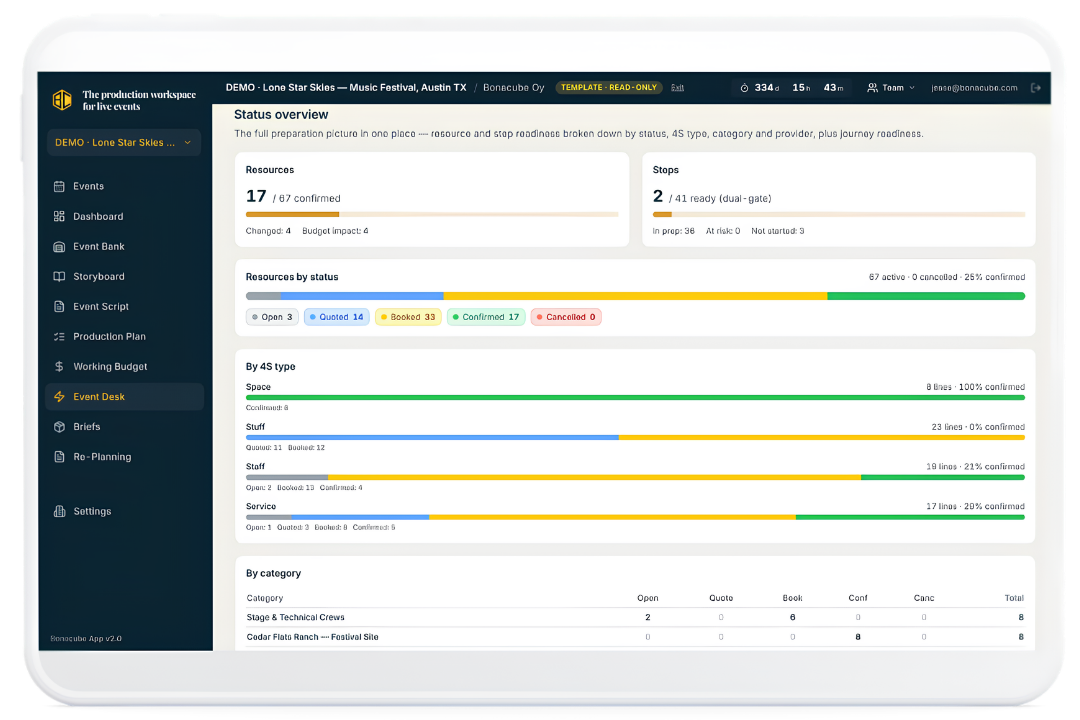
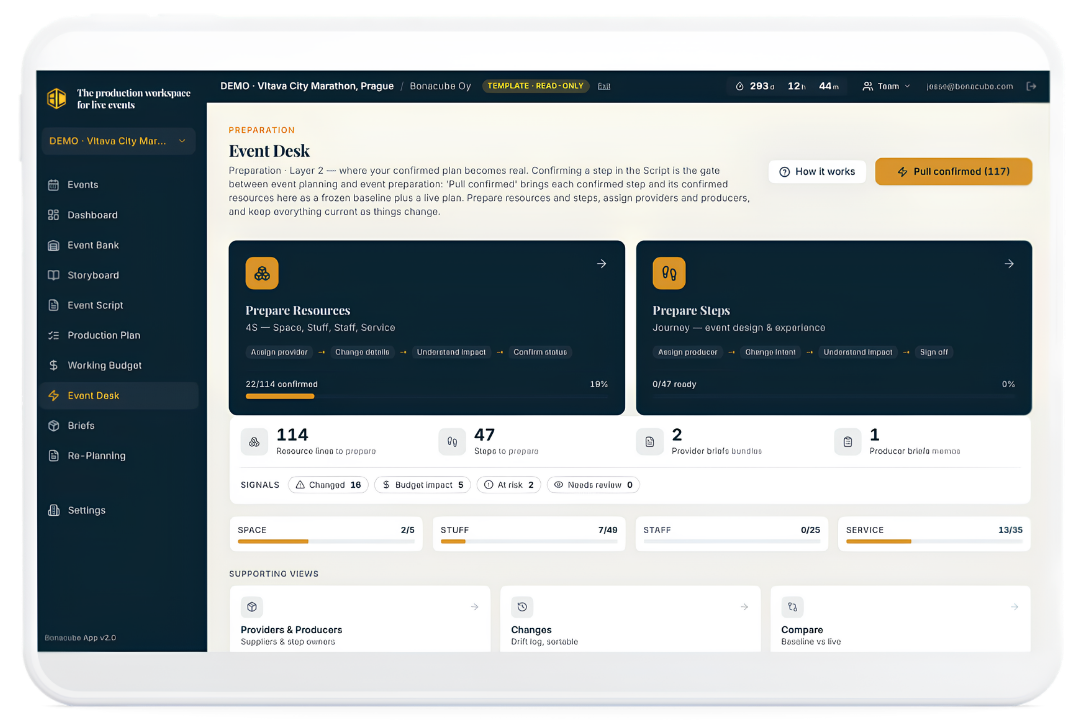
Bonacube Event Desk — the preparation hub of a live event plan

The Event Desk — where the confirmed plan becomes real work your team can prepare.

The problem

The Plan Looks Good. Until People Have to Work From It.

The concept has been approved. The presentation looks strong. Everyone understands what the event is meant to become.

Then the real planning begins.

The guest journey is developed in one document. The equipment list is built in a spreadsheet. The budget sits in another spreadsheet. Venue notes are added to a shared folder. Supplier quotes arrive by email. Staffing needs are discussed in meetings. Preparation tasks are added to a project tool.

Changes keep coming. And slowly, the event that looked so clear on paper becomes harder to see.

Not because the team is careless. Because the event is being planned in too many different places.

DOC Guest Journey PPT Production Plan XLS Budget Final XLS Budget Final 2 PDF Supplier Brief XLS Staff Plan DOC Venue Notes

One person understands the experience. Another understands the budget. Another knows the spaces. Another knows the suppliers. Another knows what changed yesterday.

But nobody can easily see the whole event.

That is when details begin to disappear. Costs drift away from the plan. Suppliers work from old information. Preparation gaps are found later than they should be. And the event team spends more time checking documents than improving the event.

Bonacube was created to keep the event together.

Not another list

You Do Not Need Another List.
You Need the Event to Stay Whole.

A task list can tell someone to prepare the entrance. It does not explain what the entrance experience is meant to be, what resources that moment needs, or whether the approved plan and the current plan are still the same. Bonacube starts with the event itself — the people, the journeys, the stages, the moments — then connects each moment to the production work needed to make it happen.

“Doors open” becomes:
SpaceThe entrance lobby
StaffTwo guest hosts
StaffFour security staff
StuffTwo scanners
StuffQueue barriers
ServiceA security provider
TimingA start time
StatusA preparation status
BudgetA cost & a responsible person

Now the team has something it can prepare. Not just an idea. Not just a task. A real part of the event plan.

Storyboards · Stages · Steps

Plan the Event the Way People Will Experience It.

Bonacube begins with the journey. Create a Storyboard for each journey you need to plan — the guest journey, the participant journey, the crew journey, the build-up, the show, the hospitality experience, the breakdown. Divide each journey into stages, then divide each stage into individual steps.

Arrival Entry Main programme Hospitality Departure
Bonacube Storyboard — journeys divided into stages and steps

Storyboards, Stages and Steps are the backbone of the event plan. The rest of the app builds from that structure.

Walking through the event moment by moment helps your team find needs that are easy to miss in a flat spreadsheet. It keeps the guest experience at the centre of the production plan — because every operational decision should support something the event is trying to create.

The Event Bank

Every Moment Needs Four Things.

Space

Where does it happen?

A venue. A room. An entrance. A field of play. A backstage area. A hospitality space.

Stuff

What physical items are needed?

Furniture. Signs. Scanners. Barriers. Technical equipment. Vehicles. Structures. Tools.

Staff

Who makes it happen?

Hosts. Security. Crew. Volunteers. Technicians. Managers. Medical staff.

Service

Which outside support is required?

Catering. Cleaning. Transport. Security. Production. Rental. Technology. Waste services.

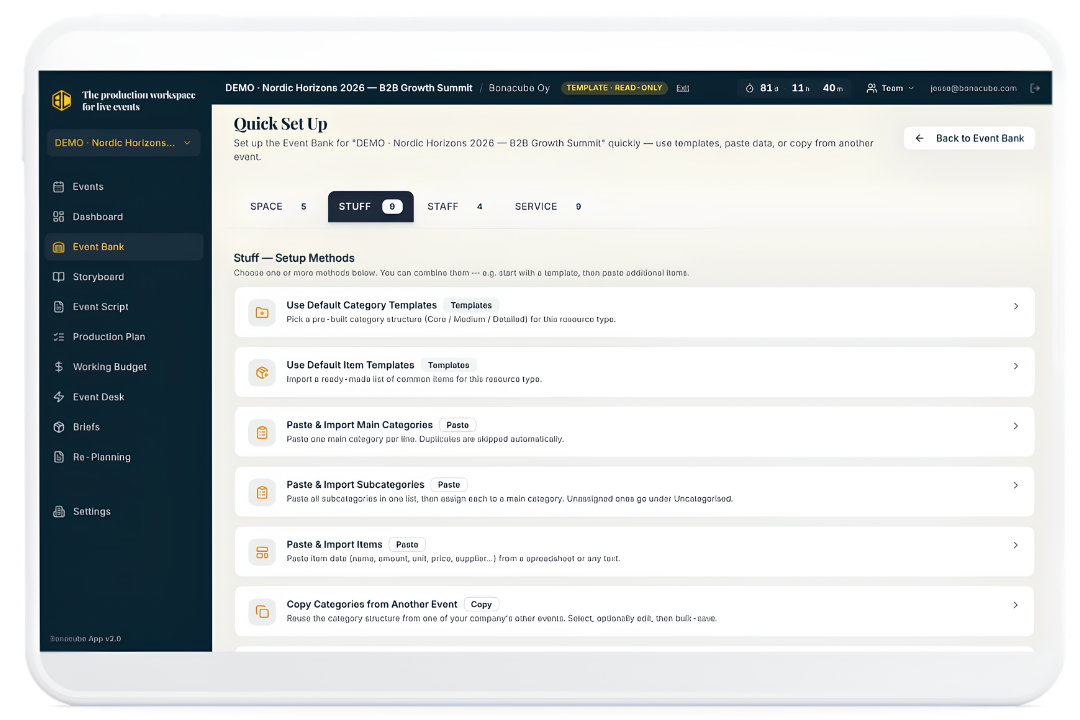
Bonacube brings these four parts together. You add them once to the Event Bank, then use them throughout the event plan. Each item can carry its quantity, unit and price. No repeated typing. No different name for the same item in five different files. No budget line with no clear link to the event.

Bonacube Event Bank — quick set-up of Space, Stuff, Staff and Service resources

The Event Bank becomes the shared library used by the Storyboard, Script, Budget and Event Desk.

The Event Script

Turn the Experience Into a Production Plan.

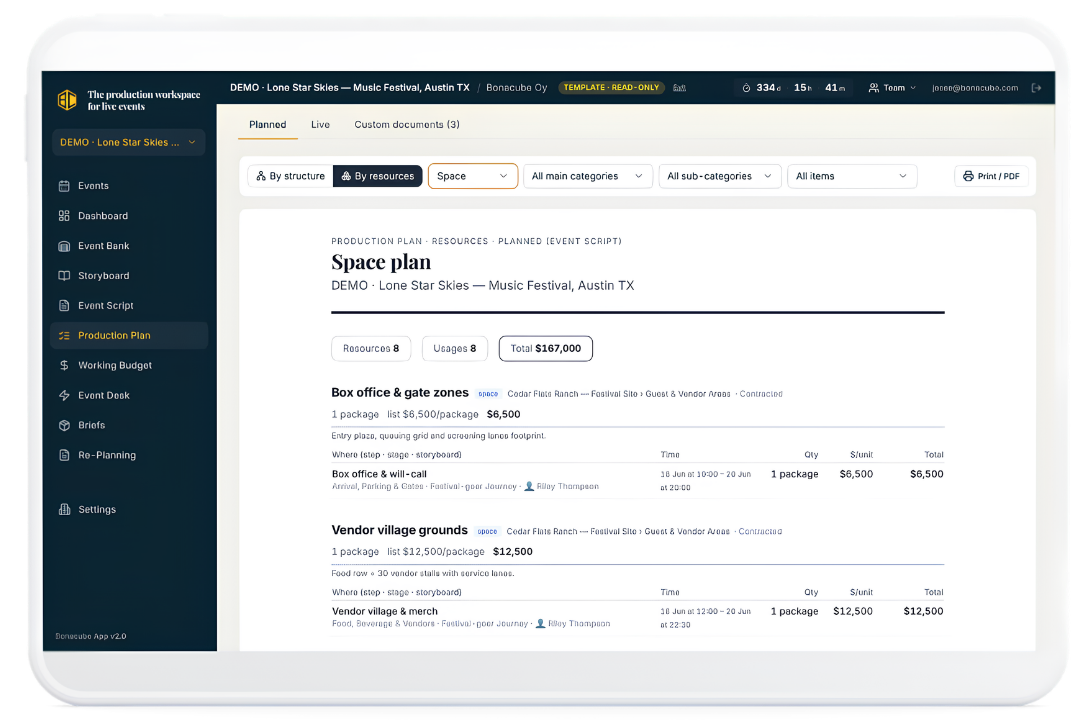
The Event Script is where the event idea becomes practical. Select a step from the Storyboard. Attach the resources it needs. Add the correct amount. Check the price. Confirm the responsible provider. Continue through the event one step at a time. A vague plan becomes detailed. A broad idea becomes work people can understand. And every production choice stays connected to the moment that created it.

Bonacube Production Plan — resources connected to event steps with quantities and costs

This is the living heart of Bonacube. Each line connects an event step to a production resource, quantity and cost.

That connection matters.

“Why do we need this?”
You can show them.
“What created this cost?”
You can show them.
“Where is this item used?”
You can show them.
“What happens if we remove this?”
You can see what it affects.
The Working Budget

Stop Building the Budget Twice.

Most event budgets are maintained separately from the production plan. Someone adds a resource to the plan; someone else adds the cost to a spreadsheet. A quantity changes — the budget is not updated. Bonacube works differently. The Working Budget is built from the production plan. Every resource line carries its quantity and price, and those costs roll into the budget automatically. The budget is not an estimate someone typed into another file. It is the financial view of the actual plan.

Resource · Event step
Planned
Live
Difference
Queue barriers — Doors open
€1,800
€1,800
Security staffing — Doors open
€6,400
€7,600
+€1,200
Entrance scanners — Doors open
€950
€950
Working Budget
€84,450
€86,700
+€2,250
Why is the budget higher? Security staffing increased from 4 to 6 staff at “Doors open” — the change, the cost and the event step behind it are all on the same line.

Change the plan and the current budget changes with it. Finance can see what was originally planned, what the current plan costs, the difference between the two, the resource that caused the change — and the event step behind the resource.

Planned vs Live

Plans Change.
You Should Always Know What Changed.

The event plan will change. That is normal. The problem is not the change — the problem is losing the original plan and no longer knowing how the event reached its current state. Bonacube keeps two views: Planned, the confirmed production plan your team approved, and Live, the current plan as preparation moves forward. The approved baseline stays in place. The live plan changes. Bonacube shows the difference.

Planned
€84,450
Live
€86,700
Difference
+€2,250
Security staffing increased 4 → 6 staff · Doors open+€1,200
Stage riser package upgraded after venue review · Main programme+€1,450
Printed signage reduced — digital screens instead · Arrival−€400

You can see what moved, what it did to the budget, who is responsible, what still needs approval — and whether the current plan still reflects the event the team intended to produce.

Preparation status

See What Is Ready.
See What Still Needs Work.

A production plan can contain hundreds of resources. A long list does not tell you whether they are prepared. Bonacube lets each resource move through a clear status:

Preliminary Quoted Booked Confirmed
Bonacube Event Desk status overview — resources and steps by status, 4S type and category

Instead of asking every team leader for a separate update, you can see the current state of preparation in one place.

You can see which areas are progressing, which suppliers are still missing, which event steps are ready, which resources need attention — and which decisions are holding up the plan.

Provider & Producer Briefs

Give Suppliers a Brief That Stays Current.

A supplier does not need your whole internal production plan. They need the part that belongs to them: what must they supply, where will it be used, when is it needed, which event step does it support, what has been agreed — and what is still open.

Bonacube lets you choose the exact plan lines a supplier or producer needs. Then you share a live Brief. The supplier sees the current items, context and timing. They do not see your internal budget. They can comment on the relevant lines.

The same Brief can move through quoting, confirmation and preparation. When an approved change enters the live plan, the connected information stays current.

No need to create another PDF. No need to send version seven. No need to wonder whether the supplier opened the latest attachment.

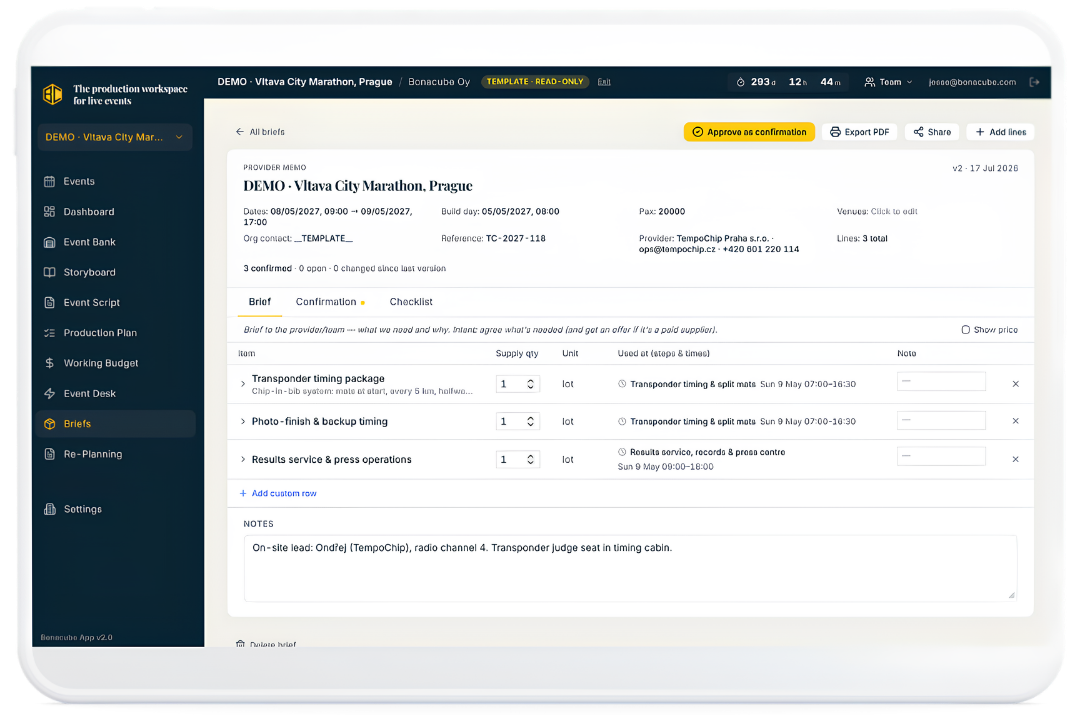
Bonacube Brief — one live document per provider with Quote, Confirmation and Checklist tabs

One current Brief for the whole supplier relationship — Quote, Confirmation, Checklist. Briefs remain linked to the production plan instead of becoming separate copies.

One plan, many views

Give Every Team the View It Needs.

One shared production plan does not mean everyone needs to see everything. Event leadership needs the full picture. Finance needs costs and changes. Venue teams need spaces, timings and requirements. Staff leads need people and responsibilities. Suppliers need only the items they must provide. Bonacube lets you view the same event plan by Storyboard, Stage, Step, Space, Stuff, Staff, Service, category, individual resource, provider or responsibility — and create a focused document for the person receiving it. Show prices when they need them. Hide prices when they do not.

Finance Plan

Costs, changes and the difference between the approved budget and the current plan.

Venue Plan

What each space must support — timings, resources and operations linked to each area.

Supplier Brief

Only the items they must provide, with the context needed to deliver properly.

All three come from the same data. Everyone works from the same event plan. Nobody needs the whole internal plan just to do their part.

Before the doors open, every detail needs a place.

A place in the plan. A person responsible. A supplier. A cost. A status. A clear next step.

Re-Planning

The Next Event Should Not Start From Zero.

The most useful information about an event often appears late in the process: the real quantity, the real price, the supplier that worked, the step that needed more people, the operation that should be removed next time. Most of that knowledge disappears — it stays in someone's head, sits in an old spreadsheet, gets discussed in a review meeting and is never used again. Bonacube keeps the learning inside the plan.

2026 Event

After the event, review what really happened.

Keep what worked Adjust what needs improvement Drop what does not belong
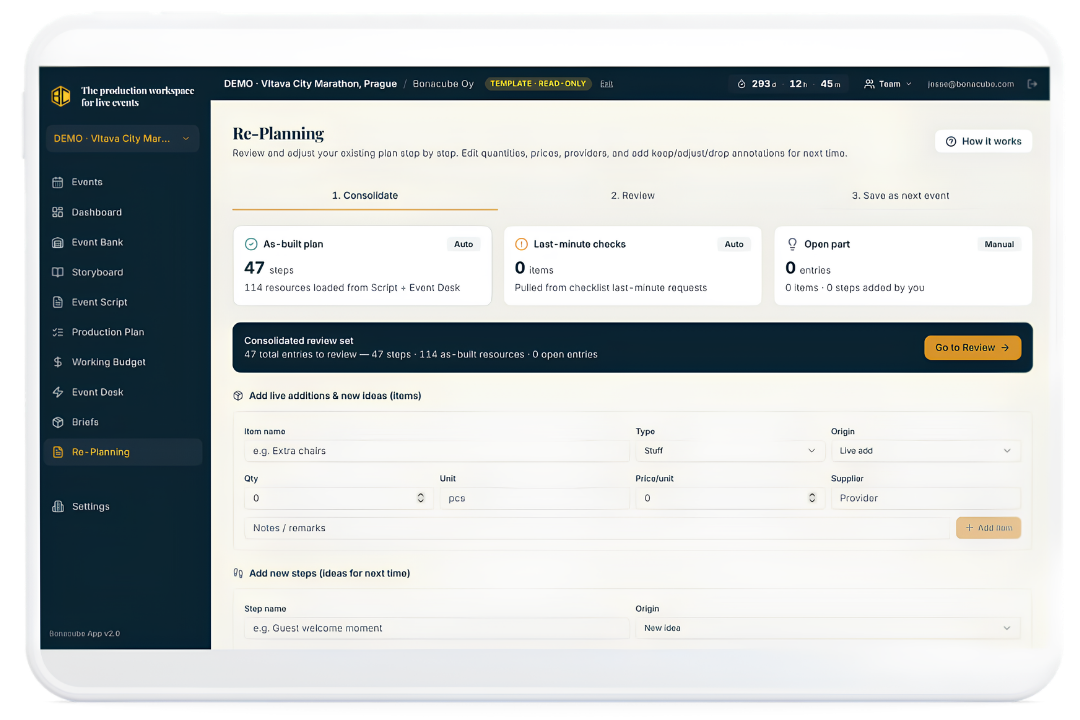
Bonacube Re-Planning — consolidate, review, and save as the next event

Re-Planning allows reviewed steps, quantities, prices and providers to become the starting point for the next edition. Saved work — knowledge that grows in value.

What Changes With Bonacube?

Without Bonacube

  • The event experience lives in one place. Production needs live somewhere else.
  • The budget is updated by hand.
  • Supplier Briefs become outdated.
  • Changes are difficult to trace.
  • Each team works from its own view of the event.
  • Missing details appear late.
  • The next edition begins with another spreadsheet.

With Bonacube

  • The event journey drives the production plan.
  • Every moment is connected to what it needs.
  • The budget follows the plan.
  • The approved baseline remains visible. The current plan shows every change.
  • Suppliers receive the information they need.
  • Preparation status can be seen.
  • The next event starts with what the team already learned.

The demo opens three real event plans — a marathon, a festival and a B2B conference.

Who it's for

Built for the People Who Have to Make the Event Happen.

Event directors

See the full event plan. See progress. See gaps. See what changed.

Production teams

Know what every stage and step needs. Connect the plan to real resources and responsibilities.

Finance teams

See where costs came from. Track the difference between the approved budget and the current plan.

Venue teams

See what each space must support. Understand the timing, resources and operations linked to each area.

Staff leads

See the people and roles required across the event journey.

Suppliers

Receive a clear, current Brief with the context needed to deliver properly.

Bonacube Is Not Another Event Management System.

Bonacube does not try to manage every part of the event business.

Ticketing system Marketing platform Registration system Customer database Live show control Incident management

Bonacube focuses on the operational work that happens before the live event begins.

Planning the experience. Defining the production needs. Building the budget. Preparing resources. Working with suppliers. Tracking changes. Turning the approved event idea into a plan people can implement.

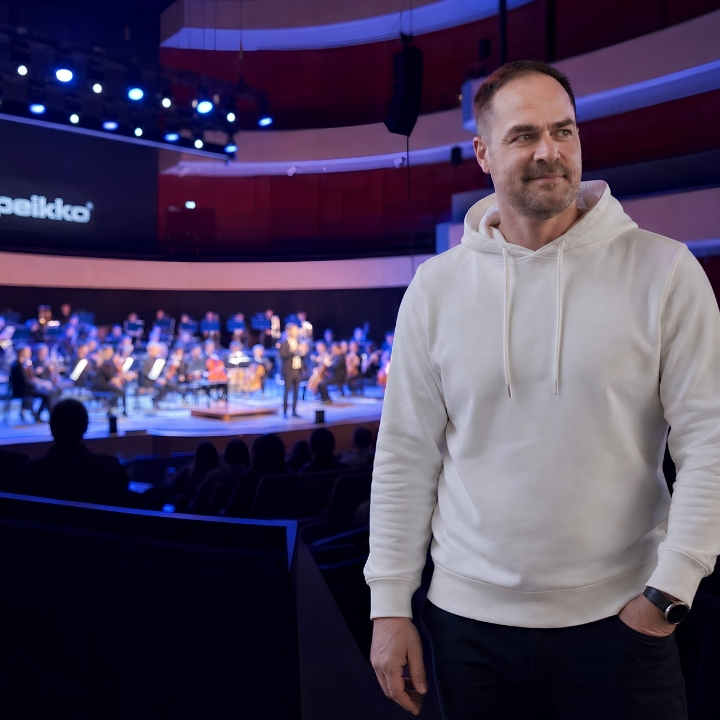
Jesse Kiuru, founder of Bonacube App, in an event venue
Why Bonacube App exists

Built Because the Tool Was Simply Missing.

For years, I planned and produced live events using the same mix of presentations, spreadsheets, documents, emails and meetings used across the industry. Each tool handled one part. None of them kept the event experience, production resources, costs, suppliers and preparation connected.

The result was familiar: more copying, more checking, more updating, more time spent explaining how one file connected to another.

So I started building Bonacube App. Not as a generic project management tool. Not as another place to write tasks. As a production workspace built around the way live events are actually planned and prepared for smooth implementation and great event delivery.

Jesse Kiuru
Founder of Bonacube App
Developed from practical experience in major event planning and production, with work connected to events including the FIS World Ski Championships, Winter World Masters Games, Lahti Ski Games, MotoGP Finland Test, MXGP Finland and 10+ conferences and galas.
The maths

Bonacube Does Not Need to Save Much Time to Pay for Itself.

€1,997 per year
≈ 16 hours at €125 per hour
Across the whole team. Across the whole year.
Rebuilding a production plan. Updating the same figures in several files. Creating new supplier Briefs. Checking which document is current. Explaining where a budget change came from. Starting the next event from zero — 16 hours can disappear quickly.

That is before you count the cost of a missing resource discovered late, a supplier working from old information, a quantity that changed but never reached the budget, a production requirement that was never assigned — or knowledge lost before the next event. One avoided mistake can be worth more than the annual licence.

Pricing

Choose Bonacube Team.

Bonacube Team
€1,997
per year
Save €367 compared with monthly billing
or €197 per month · prices exclude VAT
Up to 5 active events · no setup fee

Your Bonacube Team licence includes

  • Up to 5 active events
  • One named account owner
  • Two additional team members per event
  • Unlimited completed & archived events
  • Unlimited reuse of archived event plans
  • Event Bank
  • Storyboards
  • Event Script
  • Production Plan
  • Working Budget
  • Event Desk
  • Provider and Producer Briefs
  • Planned and Live comparison
  • Change tracking
  • Re-Planning
  • Quick setup tools
  • Built-in instructions throughout the app
  • Product updates
  • Technical support

An active event is an event currently being planned or prepared. Archived events do not count toward the five-event limit.

Personal onboarding, consulting and event-specific advice are not included in the software licence.

Need more than five active events or several account owners? Ask about a Company licence

The first test

See Bonacube Work With Your Own Event.

You have 14 days to test Bonacube. Do not begin by trying to build your whole event. Choose one real journey. Add three event steps. Attach the Space, Stuff, Staff and Services they need. Add quantities and prices. Then see the Production Plan and Working Budget build from the same information. That is the fastest way to understand what Bonacube changes.

1

Create one journey

2

Add three steps

3

Connect the resources

4

See the plan and budget

Built-in guidance explains what each feature does, why it matters and what to do next. No personal onboarding is required.

Start my 14-day free trial
Questions

Frequently Asked Questions

What is Bonacube?

Bonacube is the production workspace for live events. It helps event teams plan the event experience, connect every moment to its production needs, build the Working Budget, prepare resources and suppliers, track changes and create the plans needed for implementation.

Is Bonacube used during the live event?

Bonacube focuses on planning and preparation before the live event begins. It is not a live show control, incident management or event command system.

Does Bonacube replace our project management tool?

Bonacube solves a different problem. Project management tools organise tasks and deadlines. Bonacube builds the event production logic: what happens, what each moment needs, what it costs, who supplies it, what has changed. Your team may still use a project management tool for general company tasks and deadlines.

Can we bring information in from a spreadsheet?

Yes. The Event Bank includes quick setup options for pasting information from a spreadsheet, using a template or copying resources from another event.

Can suppliers see our internal budget?

No. You choose which lines appear in a supplier or producer Brief. They see the information, context and timing they need without seeing your full internal budget.

What happens when the plan changes?

The approved plan remains visible as the baseline. The Live plan shows the current state. Bonacube records the difference and updates the connected budget, status, Briefs and change information.

Can we use a past event as the starting point for a new event?

Yes. Archived events do not count toward the five active event limit. Re-Planning lets you review what happened, keep what worked and use the improved plan as the starting point for the next edition.

How many people can use Bonacube Team?

The plan includes one named account owner. Each active event can include two additional team members.

Is onboarding included?

No personal onboarding is included. Bonacube is self-guided. Instructions inside the app explain what each feature is, why it matters and what to do next. Technical support is included. Consulting and event-specific advice are separate services.

What happens when we need more than five active events?

Contact Bonacube about a Company licence for larger event portfolios and organisations that need more account owners.

Before the Doors Open,
Every Detail Needs a Place.

A place in the plan. A person responsible. A supplier.
A cost. A status. A clear next step.

Bonacube brings those details together — so the event your team approved does not get lost between presentations, spreadsheets, budgets, suppliers and preparation.

Make the Event on Paper Work in Real Life.

€1,997 per year  or  €197 per month

Up to 5 active events · One named account owner · Two additional team members per event
Unlimited archived events · All features included · Built-in guidance throughout the app